Thursday, April 3, 2014

Joining ON tables (ANSI)

Here is a quick look at the ANSI JOIN ON syntax.
Plenty of people have looked at this as well. Here are some good, brief desciptions
http://www.w3schools.com/sql/sql_join.asp
http://en.wikipedia.org/wiki/Join_(SQL) (of course!)
http://www.oracle-base.com/articles/9i/ansi-iso-sql-support.php (first part of the article - 9i was the version of Oracle where this was introduced!)

However, I could not resist adding my own humble example.

Imagine the following entities.


Inside Chores we find -

CHORE_IDCHORE_DESC
10Change Cat Litter

Inside Tasks we find -

TASK_IDTASK_DESCHOW_LONG_HRCHORE_ID
1Overcome your revulsion.110
2Get your supplies (another liner, more cat litter.210
3Empty Soiled Cat Litter into Garbage.110
4Replace Liner.110
5Pour in Litter.110

How do we know which task lines up with which chore?
In tasks, we have CHORE_ID. The value of CHORE_ID in TASKS references CHORE_ID in CHORES.

So we want to join on the rows ON the condition where CHORES.CHORE_ID is the same as TASKS.CHORE_ID. The syntax and results follow.

SELECT *
FROM   chores c
  JOIN tasks t
    ON (c.chore_id = t.chore_id);​

CHORE_IDCHORE_DESCTASK_IDTASK_DESCHOW_LONG_HRCHORE_ID
10Change Cat Litter1Overcome your revulsion.110
10Change Cat Litter2Get your supplies (another liner, more cat litter.210
10Change Cat Litter3Empty Soiled Cat Litter into Garbage.110
10Change Cat Litter4Replace Liner.110
10Change Cat Litter5Pour in Litter.110

I would read this as -
SELECT *                          -- show everything
FROM   chores c                   -- from chores
  JOIN tasks t                    -- joining (combining) with tasks
    ON (c.chore_id = t.chore_id);​ -- on the condition where the CHORE_ID is equal in both tables

The "c" and "t" are "Table Aliases" and our way of communicating to the database where a column comes from. In the case of Joins, it is not obvious which table has which column. YOU SHOULD ALWAYS USE table aliases in any join on ALL columns.

I am going to clean up this query a bit. We don't need CHORE_ID in there twice and I am going to make the sort order explicit.

SELECT c.chore_id,
       c.chore_desc      AS CHORE,
       t.task_id         AS STEP,
       t.task_desc       AS DESCRIPTION,
       t.how_long_hr* 60 AS minutes
FROM   chores c
  JOIN tasks t
    ON (c.chore_id = t.chore_id)
ORDER BY c.chore_id ASC, 
         t.task_id  ASC;​


CHORE_IDCHORESTEPDESCRIPTIONMINUTES
10Change Cat Litter1Overcome your revulsion6
10Change Cat Litter2Get your supplies (another liner, more cat litter12
10Change Cat Litter3Empty Soiled Cat Litter into Garbage6
10Change Cat Litter4Replace Liner6
10Change Cat Litter5Pour in Litter6

There are also OUTER joins! I'll defer to w3Schools for these.

http://www.w3schools.com/sql/sql_join_left.asp
http://www.w3schools.com/sql/sql_join_right.asp
http://www.w3schools.com/sql/sql_join_full.asp

And we have CROSS and NATURAL joins.
http://www.w3resource.com/sql/joins/cross-join.php
http://www.w3resource.com/sql/joins/natural-join.php

Finally, there is also JOIN USING.
http://stackoverflow.com/questions/16162897/oracle-using-clause-best-practice
(Normally, I would LOVE this syntax but I have a pet peeve with how it handles table aliases on columns being utilized in the USING clause.)

And, as far as WHY you should use ANSI syntax for this, I defer to this article.
http://stackoverflow.com/questions/18891148/oracle-joins-comparison-between-conventional-syntax-vs-ansi-syntax
(Obvious Oracle bias here but the philosophy crosses implementations!)

Syntax to recreate this example is below.

DROP TABLE chores CASCADE CONSTRAINTS;
CREATE TABLE chores
(
  chore_id   NUMBER(3),
  chore_desc VARCHAR2(100)
)
;

ALTER TABLE chores
ADD CONSTRAINT chores_pk
PRIMARY KEY (chore_id);

DROP TABLE tasks CASCADE CONSTRAINTS;
CREATE TABLE tasks
(
  task_id     NUMBER(4),
  task_desc   VARCHAR2(100),
  how_long_hr NUMBER(5,2),
  chore_id    NUMBER(3)
);

ALTER TABLE tasks
ADD CONSTRAINT tasks_pk
PRIMARY KEY (task_id);

ALTER TABLE tasks
ADD CONSTRAINT tasks_chores_fk
FOREIGN KEY (chore_id)
REFERENCES chores(chore_id);

INSERT INTO chores
    (chore_id, chore_desc)
VALUES
    (10,'Change Cat Litter');

INSERT INTO tasks
    (task_id, task_desc, how_long_hr, chore_id)
VALUES
    (1,'Overcome your revulsion',0.1,10);

INSERT INTO tasks
    (task_id, task_desc, how_long_hr, chore_id)
VALUES
    (2,'Get your supplies (another liner, more cat litter',0.2,10);

INSERT INTO tasks
    (task_id, task_desc, how_long_hr, chore_id)
VALUES
    (3,'Empty Soiled Cat Litter into Garbage',0.1,10);

INSERT INTO tasks
    (task_id, task_desc, how_long_hr, chore_id)
VALUES
    (4,'Replace Liner',0.1,10);

INSERT INTO tasks
    (task_id, task_desc, how_long_hr, chore_id)
VALUES
    (5,'Pour in Litter',0.1,10);

Have fun!


Wednesday, April 2, 2014

Scripts in APEX (Application Express)

Most people, when creating data structures, do so in scripts. In Oracle Application Express (APEX), there is a scripting functionality available.

Here is a quick demo.

Imagine the following ERD.

This, with some minor additions, would translate into the following Table Structure Diagram (TSD)


(The additions are the ShipRoster.DateJoined/Left columns)

Before going much further, a quick word about DDL. DDL stands for "Data Definition Language" and is a subset of SQL (Structured Query Language). 
DDL does tend to shift a bit depending on the implementation of the database (ie. Oracle, MS, IBM).

For example, here is the SQL needed to create STARSHIP table in Oracle, SQL Server and DB2

ORACLE
CREATE TABLE STARSHIP
  (
    Registry VARCHAR2 (20) NOT NULL ,
    ShipName VARCHAR2 (30) ,
    Class    VARCHAR2 (30)
  ) ;

SQL Server
CREATE
  TABLE STARSHIP
  (
    Registry VARCHAR (20) NOT NULL ,
    ShipName VARCHAR (30) ,
    Class    VARCHAR (30) ,
    CONSTRAINT STARSHIP_PK PRIMARY KEY CLUSTERED (Registry)
WITH
  (
    ALLOW_PAGE_LOCKS = ON ,
    ALLOW_ROW_LOCKS  = ON
  )
  ON "default"
  )
  ON "default"
GO

DB2
CREATE
  TABLE STARSHIP
  (
    Registry VARCHAR (20) NOT NULL ,
    ShipName VARCHAR (30) ,
    Class    VARCHAR (30) ,
    CONSTRAINT STARSHIP_PK PRIMARY KEY ( Registry )
  )
  NOT VOLATILE ;
CREATE UNIQUE INDEX STARSHIP_PK ON STARSHIP
  (
    Registry ASC
  )
  DEFER NO ;

In this case, Oracle is closer to ANSI (check it out here) and it is easier on the eyes so I am sticking with this.
(Full Disclosure : I am an Oracle employee AND I am NOT showing you all the options in a CREATE TABLE statement. But, for what I am showing, Oracle/ANSI is the easiest syntax to look at!)

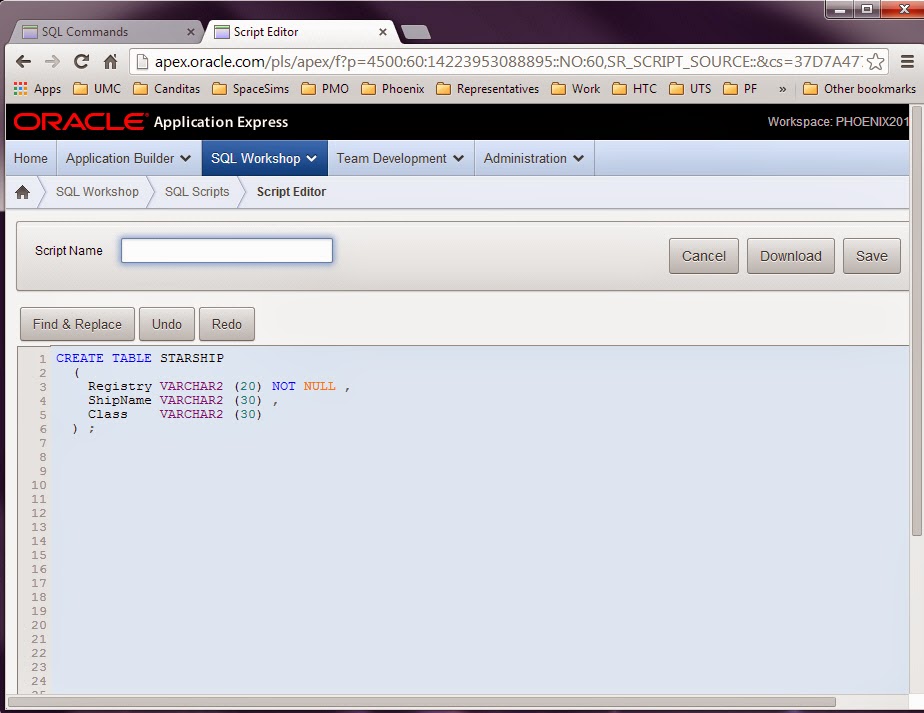
Now, let's say you want to create this in APEX. Here is a quick screenshot.


APEX is a "cloud" environment that ANYONE (and I mean ANYONE) can jump onto. (Maybe not ANYONE ... There may be some restrictions BUT this account was created by my non-Oracle email address. It is pretty slick and, again, DON'T CREATE PRODUCTION APPLICATIONS on it (similar to the Virtual Machines I have talked about in other posts) but it is certainly good to go and learn a few things on..)

After you have created an account and logged in, you will see you have a "SQL Workshop." Clicking on that gives you two options that are relevant here.


"SQL Commands" and a "SQL Scripts" icons.

SQL Commands : Run one command at a time.
SQL Scripts : Run one or more commands at a time.

Creating the above TSD with STARSHIPS,  SHIPROSTER and CREWPERSON would take quite a few commands.
- You need 3 CREATE TABLE commands.
- You need (or should have) 3 Primary Key Constraints
- You need 2 Foreign Key Constraints.
- And, if you want your script to be able to be run again and again without errors, you need 3 DROP commands.

That's 11 SQL statements! Good thing we weren't creating an enterprise application!

But what you *may* want to do is test out EACH statement before you run the whole thing. So here is what I am proposing, if you are using APEX. Open the "SQL Commands" and "SQL Scripts" in their own window. Pretty easy, eh? (As long as you know how to do that! Right clicking on the icon will give you the option in most browsers I know of, anyway).


Now you can test your SQL Statement in the SQL Workshop and, when you think you have it, run it in SQL Scripts.

Let's create STARSHIP and the Primary Key.We will do this in two statements.
First, put the following DDL into SQL Workshop

CREATE TABLE STARSHIP
  (
    Registry VARCHAR2 (20) NOT NULL ,
    ShipName VARCHAR2 (30) ,
    Class    VARCHAR2 (30)
  ) ;


Put the command in and click on the Run (blue) button. You will see the "Feedback" of "Table created." If you didn't - Well ... Look REALLY CLOSELY at your SQL. My example is all "Cut and Paste" so, if I did it, you should be able to do it too.

Assuming you were successful, now you can start your script! Go onto your SQL Scripts tab.


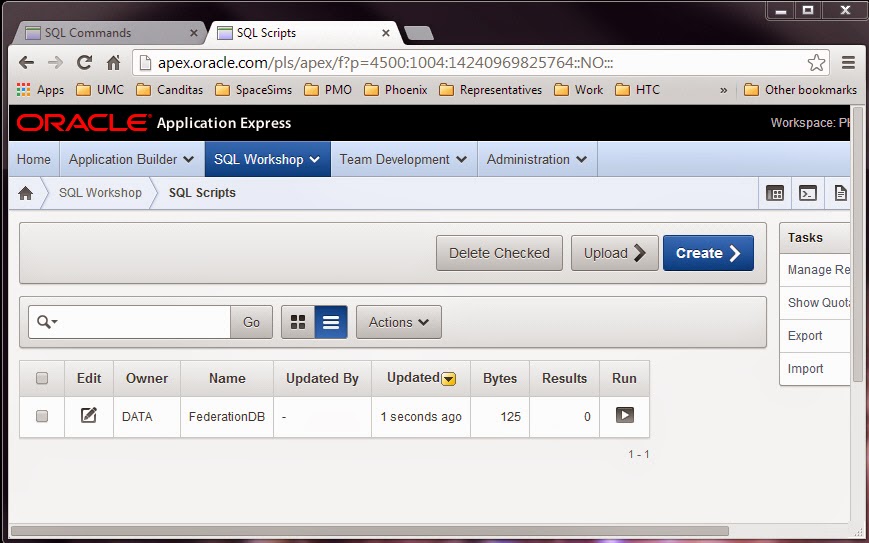
And you will see a big, blue "Create>" button. That will be how you create your script. Click on that and then put your CREATE statement in.


We should do two more things before continuing - Name and Save the script. The script will be saved in "the cloud" (though you can download it onto your machine later, if you wish).


Now ... run the script. You will get an error ... but an instructive error. (You can run by clicking on "Run" and I would "Run Now" but it doesn't really matter).


Check out your "Results!


So, you can't have two objects in the same schema with the same name (sort of ... there are exceptions, 90% of the time, this is true!). That's the error.

You need to DROP the table before you create it. Controversial but we are going to put that idea into the script.

I changed my script to have this text.

DROP TABLE STARSHIP;

CREATE TABLE STARSHIP
  (
    Registry VARCHAR2 (20) NOT NULL ,
    ShipName VARCHAR2 (30) ,
    Class    VARCHAR2 (30)
  ) ;​

Now running it and checking the results I get this...


Now, this post is already too long so I am going to leave you with this.

1) Creating two tabs in your browser for this kind of development is a good idea. Use one to test individual commands. Use the other to build your script.
2) IMHO, always put DROP statements before the object you are creating. Yes, the first time you run the script, you will get error messages (It is an error to try to drop something that does not exist) but it is a small price to pay to getting a script you can run over and over again and tweak.

Here is the Script in its final form.

DROP TABLE CREWPERSON CASCADE CONSTRAINTS ;

DROP TABLE STARSHIP CASCADE CONSTRAINTS ;

DROP TABLE ShipRoster CASCADE CONSTRAINTS ;

CREATE TABLE CREWPERSON
  (
    CID       INTEGER NOT NULL ,
    LastName  VARCHAR2 (30) NOT NULL ,
    FirstName VARCHAR2 (30) ,
    Rank      VARCHAR2 (10) NOT NULL
  ) ;
ALTER TABLE CREWPERSON ADD CONSTRAINT CREWPERSON_PK PRIMARY KEY ( CID ) ;

CREATE TABLE STARSHIP
  (
    Registry VARCHAR2 (20) NOT NULL ,
    ShipName VARCHAR2 (30) ,
    Class    VARCHAR2 (30)
  ) ;
ALTER TABLE STARSHIP ADD CONSTRAINT STARSHIP_PK PRIMARY KEY ( Registry ) ;

CREATE TABLE ShipRoster
  (
    STARSHIP_Registry VARCHAR2 (20) NOT NULL ,
    CREWPERSON_CID    INTEGER NOT NULL ,
    DateJoined        DATE NOT NULL ,
    DateLeft          DATE
  ) ;
ALTER TABLE ShipRoster 
    ADD CONSTRAINT ShipRoster__IDX 
    PRIMARY KEY ( STARSHIP_Registry, CREWPERSON_CID ) ;

ALTER TABLE ShipRoster 
    ADD CONSTRAINT ShipRoster_starship 
    FOREIGN KEY ( STARSHIP_Registry ) 
    REFERENCES STARSHIP ( Registry ) ;

ALTER TABLE ShipRoster 
    ADD CONSTRAINT ShipRoster_crew 
    FOREIGN KEY ( CREWPERSON_CID ) 
    REFERENCES CREWPERSON ( CID ) ;

And here are the results the 2nd time I ran it!


Happy Scripting!